Search Engine Optimization (SEO) is crucial for modern web applications, ensuring that content is discoverable and indexed by search engines. In this article, I will walk through how I implemented an SEO module for the AWA framework, focusing on sitemap generation—a key feature for SEO.
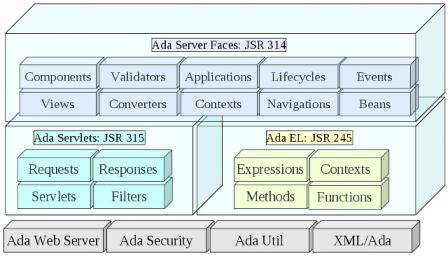
Ada Server Faces is an Ada implementation of several Java standard web frameworks.
The Java Servlet (JSR 315) defines the basis for a Java application to be plugged in Web servers. It standardizes the way an HTTP request and HTTP response are represented. It defines the mechanisms by which the requests and responses are passed from the Web server to the application possibly through some additional filters.
The Java Unified Expression Language (JSR 245) is a small expression language intended to be used in Web pages. Through the expressions, functions and methods it creates the link between the Web page template and the application data identified as beans.
The Java Server Faces (JSR 314 and JSR 344) is a component driven framework which provides a powerful mechanism for Web applications. Web pages are represented by facelet views (XHTML files) that are modelized as components when a request comes in. A lifecycle mechanism drives the request through converters and validators triggering events that are received by the application. Navigation rules define what result view must be rendered and returned.
Ada Server Faces gives to Ada developers a strong web framework which is frequently used in Java Web applications. On their hand, Java developers could benefit from the high performance that Ada brings: apart from the language, they will use the same design patterns.
Ada Server Faces, fév. 2013
The new version of Ada Server Faces is available and brings the following changes:
The Security packages was moved in a separate project: Ada Security,
New demo to show OAuth and Facebook API integration,
Integrated jQuery 1.8.3 and jQuery UI 1.9.2,
New converter to display file sizes,
Javascript support was added for click-to-edit behavior,
Add support for JSF session beans,
Add support for servlet error page customization,
Allow navigation rules to handle exceptions raised by Ada bean actions,
In previous articles, we have seen that an Ada Server Faces application has a presentation layer composed of XHTML and CSS files. Similar to Java Server Faces, Ada Server Faces is a component-based model and we saw how to write the Ada beans used by the application. Later, we also learnt how an action bean can have a procedure executed when a button is pressed. Now, how can all these stuff fit together?
Well, to finish our cylinder volume example, we will see how to put everything together and get our running web application.
Application Initialization
An Ada Server Faces Application is represented by the Application type which holds all the information to process and dispatch requests. First, let's declare a variable that represents our application.
Note: for the purpose of this article, we will assume that every variable is declared at some package level scope. If those variables are declared in another scope, the Access attribute should be replaced by Unchecked_Access.
with ASF.Applications.Main;
...
   App : aliased ASF.Applications.Main.Application;
To initialize the application, we will also need some configuration properties and a factory object. The configuration properties are used to configure the various components used by ASF. The factory allows to customize some behavior of Ada Server Faces. For now, we will use the default factory.
with ASF.Applications;
...
   C        : ASF.Applications.Config;
   Factory : ASF.Applications.Main.Application_Factory;
The initialization requires to define some configuration properties. The VIEW_EXT property indicates the URI extension that are recognized by ASF to associate an XHTML file (the compute.html corresponds to the XHTML file compute.xhtml). The VIEW_DIR property defines the root directory where the XHTML files are stored.
Ada Server Faces uses the Ada Servlet framework to receive and dispatch web requests. It provides a Faces_Servlet servlet which can be plugged in the servlet container. This servlet is the entry point for ASF to process incoming requests. We will also need a File_Servlet to process the static files. Note that these servlets are implemented using tagged records and you can easily override the entry points (Do_Get or Do_Post) to implement specific behaviors.
with ASF.Servlets.Faces;
with ASF.Servlets.Files;
...
   Faces : aliased ASF.Servlets.Faces.Faces_Servlet;
   Files   : aliased ASF.Servlets.Files.File_Servlet;
The servlet instances are registered in the application.
App.Add_Servlet (Name => "faces", Server => Faces'Access);
App.Add_Servlet (Name => "files", Server => Files'Access);
Once registered, we have to define a mapping that tells which URI path is mapped to the servlet.
For the purpose of debugging, ASF provides a servlet filter that can be plugged in the request processing flow. The Dump_Filter will produce a dump of the request with the headers and parameters.
with ASF.Filters.Dump;
...
   Dump    : aliased ASF.Filters.Dump.Dump_Filter;
The application object that we created is similar to a Java Web Application packaged in a WAR file. It represents the application and it must be deployed in a Web Container. With Ada Server Faces this is almost the same, the application needs a Web container. By default, ASF provides a web container based on the excellent Ada Web Server implementation (other web containers could be provided in the future based on other web servers).
with ASF.Server.Web;
...
   WS : ASF.Server.Web.AWS_Container;
To register the application, we indicate the URI context path to which the application is associated. Several applications can be registered, each of them having a unique URI context path.
An application can provide some global objects which will be available during the request processing through the EL expression. First, we will expose the application context path which allows to write links in the XHTML page that match the URI used for registering the application in the web container.
App.Set_Global ("contextPath", CONTEXT_PATH);
Below is an example of use of this contextPath variable:
''Note: For the purpose of this example, the Compute_Bean is registered as a global object. This means that it will be shared by every request. A future article will explain how to get a session or a request bean as in Java Server Faces.''
Starting the server
Once the application is registered, we can start our server. Note that since Ada Web Server starts several threads that listen to requests, the Start procedure does not block and returns as soon as the server is started. The delay is necessary to let the server wait for requests during some time.
WS.Start;
delay 1000.0;
What happens to a request?
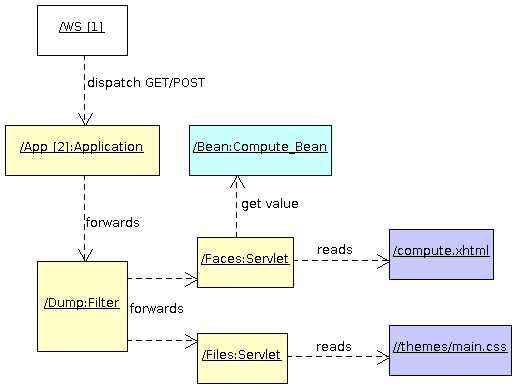
Let's say the server receives a HTTP GET request on /volume/compute.html. Here is what happens:
To write a web application, Java developers can use the servlet API. The servlet technology, created around 1997, is a simple and powerful framework on top of which many web applications and higher web frameworks have been created. This article shows how to write the same kind of web application in Ada.
Ada Servlet Framework
The Ada Servlet framework is provided by Ada Server Faces. It is an adaptation and implementation of the JSR 315 (Java Servlet Specification) for the Ada 05 language. The Ada API is very close to the Java API as it provides the Servlet, Filter, Request, Response and Session types with quite the same methods. It should be quite easy for someone who is familiar with Java servlets to write an Ada servlet.
The Ada Servlet implementation uses the Ada Web Server as a web server. In the future other other web servers such as Apache or Lighthttpd could be used.
Servlet Declaration
The servlet API is represented by the Servlet tagged type which represents the root of all servlets. A servlet must extend this Servlet tagged type and it can override one of the Do_Get, Do_Post, Do_HeadDo_Delete, Do_Put, Do_Options or Do_Trace procedure. Each Do_XXX procedure receives a request object and a response object.
with ASF.Servlets;
with ASF.Requests;
with ASF.Responses;

package Volume_Servlet is
   use ASF;
   type Servlet is new Servlets.Servlet with null record;

   --  Called by the servlet container when a GET request is received.
   procedure Do_Get (Server   : in Servlet;
                     Request  : in out Requests.Request'Class;
                     Response : in out Responses.Response'Class);
end Volume_Servlet;
Servlet Implementation
The Do_Get procedure receives the request and response as parameter. Both objects are in out parameters because the servlet implementation can modify them. Indeed, the Java servlet API allows the servlet developer to set specific attributes on the request object (This allows to associate any kind of data to the request for later use when rendering the response).
Similar to the Java API, the response is written by using the Print_Stream object that is returned by the Get_Output_Stream function.
with ASF.Streams;
package body Volume_Servlet is
   procedure Do_Get (Server   : in Servlet;
                     Request  : in out Requests.Request'Class;
                     Response : in out Responses.Response'Class) is
      Output : Streams.Print_Stream := Response.Get_Output_Stream;
   begin
      Output.Write ("...");
      Response.Set_Status (Responses.SC_OK);
   end Do_Get;
end Volume_Servlet;
Note: the complete content is omitted for the clarity of this post.
Servlet Registration
With Java servlet 2.5 specification, servlets are registered exclusively through the web.xml application descriptor file. Since Java servlet 3.0, one can register servlets programmatically. With our Ada servlet, this is was we will do with the use of the Add_Servlet method.
Since the Ada runtime is not able to create dynamically an instance of any class (such as the Java newInstance method of the Java Class class), we have to create ourselves the servlet instance object and register it. The servlet instance is associated with a name.
Once registered, we have to define a mapping that tells which URL path is mapped to the servlet. This is done by the call to Add_Mapping: every URL that ends in .html will be handled by the servlet.
The Ada Server Faces framework provides a Web container in which the application must be registered (similar to the Java Web container). The registration is done by the Register_Application call which also specifies the URL prefix for the web application (Every URL starting with /volume will be served by this application).
with ASF.Server.Web;
with ASF.Servlets;
with Volume_Servlet;

procedure Volume_Server is
   Compute : aliased Volume_Servlet.Servlet;
   App     : aliased ASF.Servlets.Servlet_Registry;
   WS      : ASF.Server.Web.AWS_Container;
begin
   --  Register the servlets and filters
   App.Add_Servlet (Name => "compute",
                    Server => Compute'Unchecked_Access);

   --  Define servlet mappings
   App.Add_Mapping (Name => "compute",
                    Pattern => "*.html");

   WS.Register_Application ("/volume",
                            App'Unchecked_Access);

   WS.Start;

   delay 600.0;

end Volume_Server;
Compilation and Execution
The compilation of the Ada servlet example is done using a GNAT project file.
$ gnatmake -Psamples
It produces the volume_server which is our web server.