Printing with an Epson PX700W printer from Ubuntu is a real challenge. No driver really work out of the box. After looking at many places, digging in dozen of forums and other answers sites, no real solution emerged. The article describes some steps to ma
Install Epson Stylus PX700W printer with CUPS on Ubuntu 8.10
By Stephane Carrez2009-05-09 14:20:51 5 comments
To print on a PX700W with Cups, you may have installed the pipslite driver from www.avasys.jp. I installed the .deb package which was supposed to be for Ubuntu. However, after installation, printing was not working and the following error message was logged in /var/log/cups/error_log:
PID 9766 (/usr/lib/cups/filter/pipslite-wrapper) crashed on signal 11!
Step 1: Get pipslite package
Get the source pipslite package. The binary (.deb) does not work for Ubuntu 8.10 and crashes.
Download for Epson Stylus Photo PX700W/TX700W,Artisan 700 for CUPS
Step 2: Get Ubuntu development libraries
Some Ubuntu development libraries are necessary:
sudo apt-get install libcups2-dev gdk-imlib11-dev \
  libcups2-dev libcupsimage2-dev libltdl7-dev libltdl7
Step 3: Build the sources
Configure as follows:
tar xvzf pipslite_1.3.0-2.tar.gz
cd pipslite-1.3.0
./configure --prefix=/usr
Then, build using make and install:
make
sudo make install
Step 4: Ubuntu Printer Configuration
Get the Epson Stylus PX700W PPD file and copy it to /usr/share/cups/model/eksppx700w.ppd.
Run the Ubuntu printer configuration:
sudo system-config-printer
Make sure the printer is connected. Then, add a printer by clicking the "New" button. The printer should be identified. Choose to use a manual PPD file and give the eksppx700w.ppd file.
My printer is connected on the network using the Wifi connection (IP address 192.168.1.10).
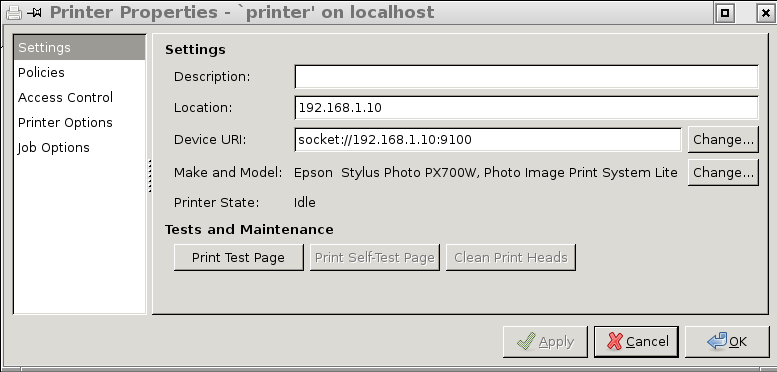
Try to print a test page. If it does not work, look at the /var/log/cups/error_log file in case there are some errors.
Tags
- Facelet
- NetBSD
- framework
- Mysql
- generator
- firefox
- application
- interview
- ReadyNAS
- Security
- binutils
- ELF
- JSF
- Java
- bacula
- Tutorial
- Apache
- COFF
- collaboration
- planning
- project
- upgrade
- AWA
- C
- EL
- J2EE
- UML
- php
- symfony
- Ethernet
- Ada
- FreeBSD
- Go
- KVM
- MDE
- Proxy
- STM32
- Servlet
- backup
- lvm
- multiprocessing
- web
- Bean
- Jenkins
- release
- OAuth
- ProjectBar
- REST
- Rewrite
- Sqlite
- Storage
- USB
- Ubuntu
- bison
- cache
- crash
- Linux
- gcc
- performance
- lex
Add a comment
To add a comment, you must be connected. Login5 comments
I'm new in ubuntu
the way you describe is it also for an EPSON STYLUS PX800 FW in Ubuntu 9.10
and is it possible to rewrite the manual for a dummy?
thx's
Hi, using debian 5.x
A print error occurred. Error message received from system:
cupsdoprint -P 'px700w' -J 'KDE Print Test' -H '/var/run/cups/cups.sock:631' -U 'root' -o ' multiple-document-handling=separate-documents-uncollated-copies orientation-requested=3' '/usr/share/apps/kdeprint/testprint.ps' : execution failed with message:
client-error-document-format-not-supported
Thanks a lot!
Do you know what can be done to have the printer print two-sided (when you have optional duplexer installed)? Setting the two-sided printing option in the system config does not work.
Thank you! I've followed your instructions and it works!